Teaching an old Android new tricks
An oldish Android phone suddenly refused to connect to an IMAP server. The error message was not helpful at all. The solution was that the IMAP server's SSL certificate had been issued by a different Certificate Authority than before, and this CA's root certificate was not known to the phone.
2026-01-01 18:00 +0100
A few days ago, my smartphone suddenly stopped synchronizing my university emails. I use Aqua Mail to work with my emails on a Samsung Galaxy S20 FE. This phone was purchased in 2021.
Aqua Mail worked perfectly well with both my personal as well as my university email accounts. But now it refused to connect to the university’s IMAP server:
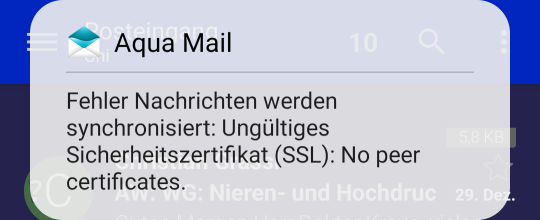
Aqua Mail complaining about the absence of a peer certificate.
The German error message says (somewhat clumsily): “Error Messages being synchronized: Invalid security certificate (SSL): No peer certificates.”
I suspected the mail server to be at fault. After all, my setup used to work. However, my laptop mail client was able to connect to the IMAP server without any problem.
Web search with “Aqua Mail no peer certificates” wasn’t helpful at all, either.
So I manually initiated an IMAP session with the server from the command line:
openssl s_client -connect $REDACTED:993 -crlf
This went well – I simply terminated the session by issuing
a logout
(If you, like me, are not fluent in IMAP – the a in front of the logout
command is an arbitrary, but required identifying prefix.)
The output started with these lines:
Connecting to [REDACTED]
CONNECTED(00000003)
depth=2 C=GR, O=Hellenic Academic and Research Institutions CA, CN=HARICA TLS RSA Root CA 2021
verify return:1
depth=1 C=GR, O=Hellenic Academic and Research Institutions CA, CN=GEANT TLS RSA 1
verify return:1
depth=0 C=DE, ST=[REDACTED], O=[REDACTED], CN=[REDACTED]
verify return:1
---
Certificate chain
# ...
This caught my eye. I remembered an announcement that the university was going to obtain their certificates from HARICA in the future, and evidently, the future is now.
Sure enough, I did not find the root certificate “HARICA TLS RSA Root CA 2021” in the root certificate store of my phone. There were 3 HARICA certificates, but not the required one “HARICA TLS RSA Root CA 2021”.
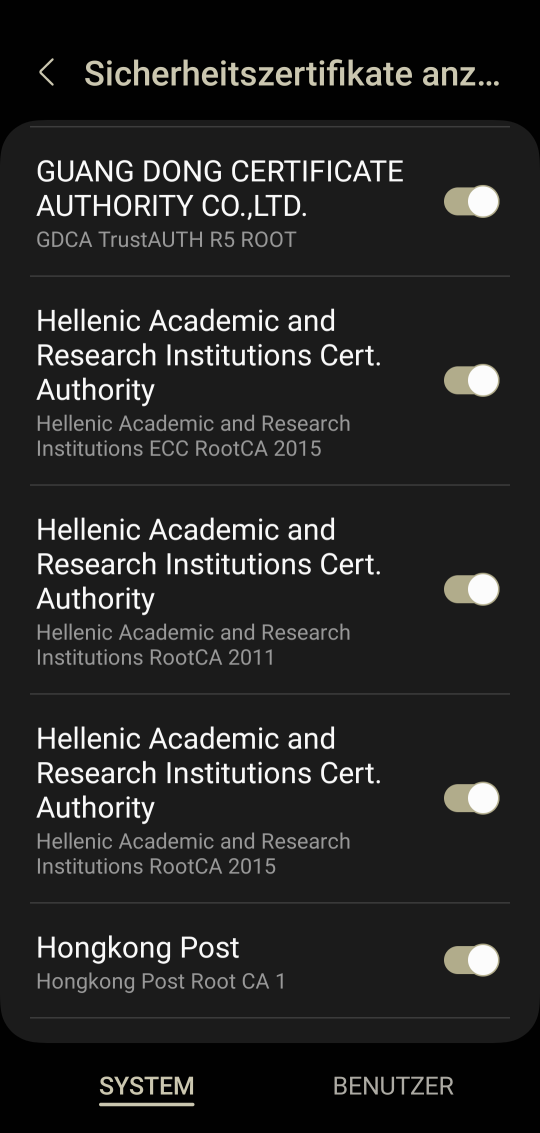
The root certificates of this 2021 Android phone do not include HARICA TLS RSA Root CA 2021.
From there, the solution was simple. I downloaded the missing root certificate from HARICA’s repository to my phone and installed it from there.
Now Aqua Mail happily syncs my uni mail account again.
Sometimes it pays off to try and teach an old dog new tricks!
Happy New Year.